
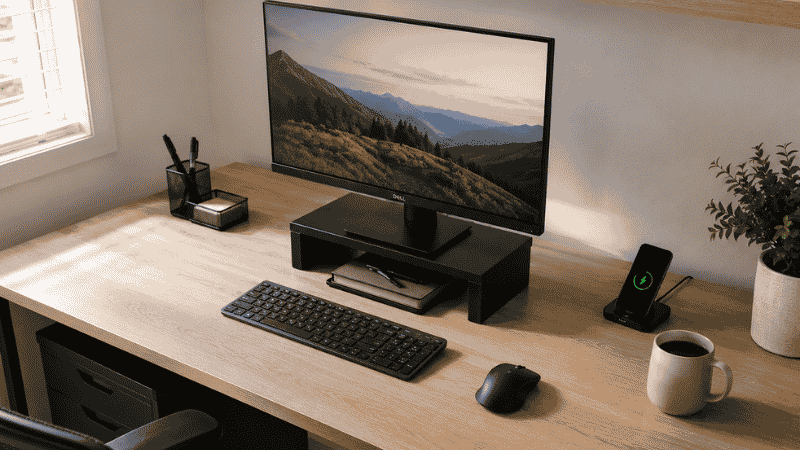
There’s a specific kind of friction that comes from a disorganized desk. Not dramatic chaos — just the low-grade version where you spend 90 seconds looking for a pen before every phone call, where the stack of papers on the left side has been there so long you’ve stopped seeing it, where the tangle of cables behind your monitor has become a permanent feature of the landscape.
Research from Princeton University’s Neuroscience Institute found that physical clutter in your visual field competes for neural resources — meaning a cluttered desk isn’t just aesthetically unpleasant, it’s measurably reducing your ability to focus on what you’re actually supposed to be doing. Every object your eye lands on that isn’t your current task is pulling a small amount of attention away from it.
For people working from home, this compounds daily. The home office doesn’t have the enforced tidiness of a corporate environment. Nobody is walking past your desk. The friction accumulates gradually, until working from your home setup starts to feel like swimming through mild resistance that you’ve stopped noticing because it’s always there.
This guide is about removing that resistance — building a desk and home office organization system that reduces daily friction, improves focus, and stays manageable long-term without requiring a dedicated cleaning session every Friday.
Key Takeaways
- Research from Princeton Neuroscience Institute found that visual clutter competes directly for cognitive attention — a cluttered desk measurably reduces your ability to focus on the task at hand.
- The most effective desk organization starts with a zone system: what you need immediately stays on the desk, everything else finds a home off the desk or out of the room.
- Cable management is the highest-impact visual improvement in most home offices — a desk with organized cables looks dramatically cleaner even with the same number of objects on it.
- Digital clutter (desktop icons, unorganized downloads folder, overflowing inbox) creates the same cognitive load as physical clutter and needs to be organized on the same schedule.
- A 5-minute end-of-day desk reset is the single habit that prevents the gradual accumulation that makes desk organization feel like a permanent project.
Step 1: The Desk Audit — Decide What Actually Earns Desk Space
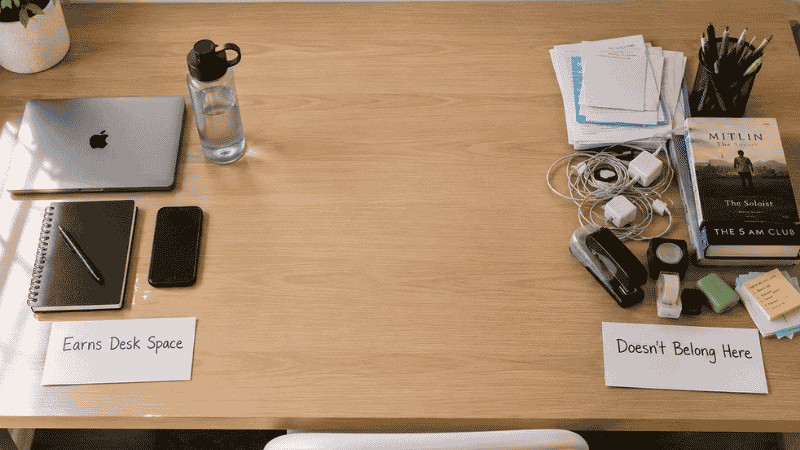
Before buying a single organizer, the desk needs an audit. Everything on the desk surface gets picked up and evaluated against one question: do I use this multiple times per day while sitting at this desk?
If yes, it earns desk space. If not, it finds a home elsewhere — a drawer, a shelf, a different room entirely.
What typically earns desk space:
- Computer/laptop and monitor
- Keyboard and mouse
- The notebook or notepad you actively use
- One pen and one highlighter (not a cup with 12 pens)
- Phone and charging cable
- Water bottle or coffee mug — one, active
What typically doesn’t earn desk space but lives there anyway:
- Stacked mail and papers from last month
- Books you might reference someday
- Office supplies you use rarely (stapler, tape, scissors)
- Personal items that migrated from elsewhere
- Charging cables for devices not currently on the desk
- Decorative items that arrived and never moved
The audit isn’t about creating a bare, sterile desk. It’s about making every item on the desk intentional. A plant earns desk space if it’s there because you want it there. Eleven charging cables do not.
Editor’s note: Most people find they remove 30–50% of desk items during this audit. The desk doesn’t get reorganized — it gets lighter. Everything else follows from that.
Desk Organization Ideas: The Zone System
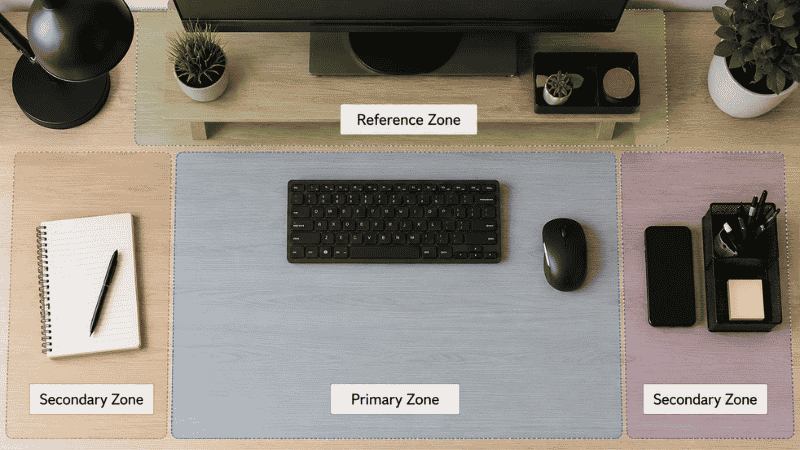
Once the desk is cleared to only essential items, the zone system assigns each part of the desk surface a specific function. This prevents the gradual re-accumulation of items in random positions.
The three desk zones:
Primary Zone — directly in front of you, arm’s length and closer. This is where your screen, keyboard, and mouse live. Nothing else should be in this zone permanently. It’s working space, not storage space.
Secondary Zone — the edges and corners of the desk within reach without leaning. This is where a notepad, a small organizer with active supplies, and your phone can live. Items here should be things you access several times daily.
Reference Zone — the back edge of the desk, or a monitor riser platform. Items here are used less frequently during the workday: reference books, a small tray for incoming papers, the lamp. This zone keeps items accessible without cluttering the working surface.
The monitor riser opportunity: A monitor riser lifts the screen to ergonomic height and — critically — creates a storage shelf underneath it. The space under a riser holds notebooks, a small keyboard, pens, or a small tray, getting these items off the main desk surface without removing them from reach. This single addition often eliminates the need for several other desk organizers.
How to Organize a Home Office: Beyond the Desk
The desk is the most visible part of a home office, but the full organization system extends to the surrounding space. A well-organized desk in a chaotic room still feels chaotic.
Home Office Organization Ideas for Storage
Vertical wall storage is the most underused resource in most home offices. A floating shelf above the desk holds reference books, binders, and backup supplies without taking any desk or floor space. Pegboard above the desk holds supplies, headphones, cables, and small tools on adjustable hooks — fully visible, immediately accessible, off the desk.
Filing systems for paper documents: Paper is the primary source of desk accumulation for most people — not because there’s too much paper, but because there’s no system for what happens to paper when it arrives.
A simple three-tray system handles most paper flows:
- Inbox tray — paper arrives here. Everything incoming sits here until processed.
- Action tray — paper that requires a specific action (sign this, pay this, read this). Limited to active items only.
- Filing tray — paper that needs to be filed but hasn’t been yet. Empties weekly into the filing system.
When paper goes directly into one of these three trays rather than onto the desk, the desk surface stays clear automatically. The paper didn’t disappear — it has a designated location in the processing pipeline.
Filing cabinets and document storage: The filing system doesn’t need to be elaborate. A single two-drawer filing cabinet under the desk holds years of documents in labeled hanging folders. The categories should reflect how you search for things, not how a librarian would categorize them — file under the name you’ll use when you can’t find it.
Small Home Office Organization Ideas
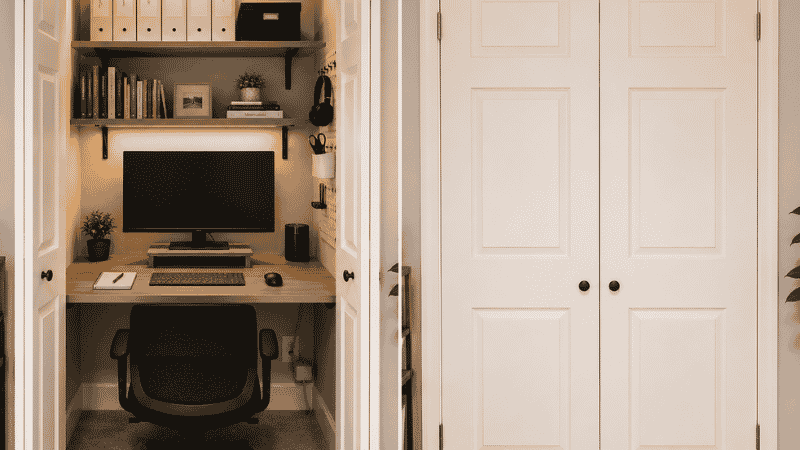
Small home offices — desk-in-a-corner setups, converted closets, bedroom workspaces — require the same zone system with stricter volume limits.
The converted closet office: Removing the closet rod and adding a desk surface and shelving creates a fully enclosed home office that disappears behind closed doors at the end of the workday. This is the most effective solution for maintaining work-life separation in small spaces.
Wall-mounted floating desk: A fold-down wall desk takes zero floor space when closed, creates a full work surface when open, and removes the desk from the room’s visual field entirely when work is done. For bedrooms that double as offices, this boundary matters for sleep quality.
The one-shelf rule for small offices: Each category of item gets one shelf or one container. Reference books on one shelf — when it’s full, a book leaves before a new one comes in. Supplies in one bin — when it’s full, something goes before something new arrives. The container defines the maximum.
How to Organize Office Supplies
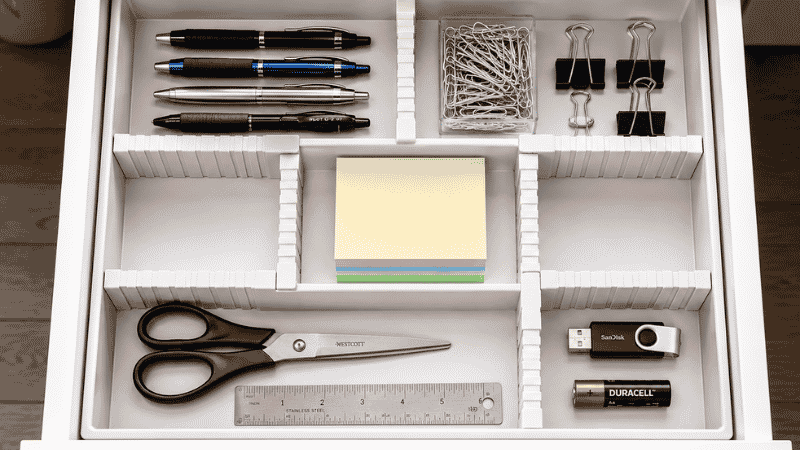
Office supplies are the items most likely to multiply unnoticed. A desk can accumulate 12 pens, three staplers, and four rolls of tape through gradual accumulation without anyone actively deciding to have that many.
The one-of-each principle: For most supplies, one is enough on the desk. One pen (your preferred one), one highlighter, one pair of scissors. Backup supplies — the box of pens, the extra tape — live in a drawer or supply bin, not on the desk surface.
Drawer organizers for small supplies: A drawer without dividers becomes a small-item graveyard — paper clips, thumb drives, AAA batteries, business cards, and rubber bands coexisting in a single layer. A simple expandable drawer divider creates dedicated compartments for each supply type, so every item has a place and missing items are immediately obvious.
The supply audit cadence: Once every 3 months, open the supply drawer and throw away dried pens, dried markers, dead batteries, and items with no clear use. This 5-minute audit prevents the silent accumulation of non-functional items that makes drawers feel overwhelming.
What should be in the supply drawer vs. elsewhere:
- In the drawer: daily-use supplies (pens, sticky notes, paper clips, stapler, scissors)
- On a shelf: reference materials, binders, books
- Out of the office entirely: backup stock (a box of 50 pens, a ream of paper)
Cable Management Ideas: The Highest-Impact Visual Fix
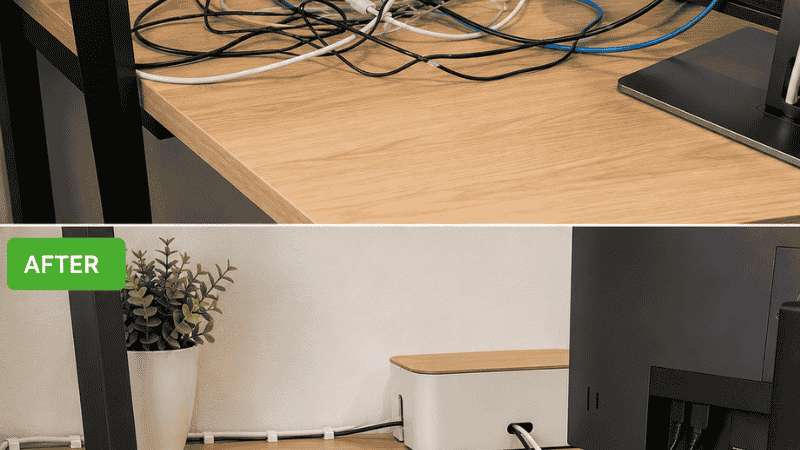
Cables are the single most common reason a well-organized desk still looks chaotic. A desk with six organized items and a tangle of eight cables behind the monitor looks messy. The same desk with managed cables looks dramatically cleaner even with more items on it.
The priority order for cable management:
Step 1: Reduce the cables. Before managing cables, count them. Many home office setups have cables for devices no longer actively used — old phones, retired monitors, adapters for technology that’s been replaced. Removing these cables is free and immediate.
Step 2: Cable clips and cable runs along desk edges. Adhesive cable clips route individual cables along the back edge of the desk and down the desk leg, keeping them flat against surfaces rather than floating in space. A cable run (a slim channel that holds multiple cables together) along the back edge of the desk consolidates the visible cable mass into one clean line.
Step 3: A cable management box for the power strip. A cable management box (a rectangular box with entry and exit holes) holds the power strip and the excess cable length inside, with only the necessary cable lengths emerging. The box sits under the desk or behind it, and the area that was a tangle of coiled cables becomes a single clean box.
Step 4: Under-desk cable trays. A mesh under-desk cable tray mounts under the desk surface and holds cables, power strips, and adapters completely out of sight. This is the most thorough cable management solution and works especially well for permanent desk setups.
For wireless transitions: Each peripheral that goes wireless (mouse, keyboard, headphones) removes a cable from the equation entirely. For most home offices, switching to wireless peripherals is the highest-leverage cable reduction available.
Digital Desk Organization: The File System That Works
Physical desk organization is half the equation. For home office workers, digital clutter creates the same cognitive load as physical clutter — a desktop covered in file icons, a downloads folder with 3,000 files, an inbox with 4,000 unread messages.
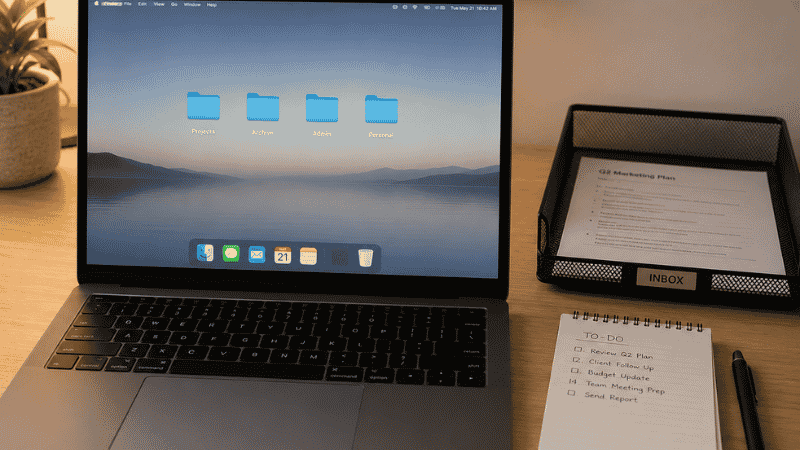
Desktop file rule: Nothing lives on the computer desktop permanently. The desktop is a temporary workspace, not a storage location. Items arrive on the desktop, get processed, and move to their permanent folder location. A desktop with zero icons (or only a few active project folders) is achievable and dramatically reduces the visual noise of every workday.
The folder system that actually works: Organize digital files the way you think about retrieving them, not the way a filing system theoretically should work. If you always search by client name, organize by client. If you search by project type, organize by type. The best system is the one where you can find any file in under 30 seconds.
A simple top-level folder structure: Projects (active work), Archive (completed work, by year), Admin (contracts, invoices, templates), Personal (personal files that live on a work computer).
Weekly digital reset: Once a week — Friday afternoon works well — clear the desktop, sort the downloads folder, and process the inbox to zero or near-zero. This 15-minute weekly habit prevents the digital accumulation that makes computers feel as overwhelming as physical desks.
Why Your Desk Keeps Getting Messy Again
If you’ve organized your desk before and it was back to chaos within two weeks, it wasn’t a product failure. It was almost certainly one of these:
There was no “landing system” for incoming items. Paper, packages, notes, and random objects arrive at the desk constantly. Without a designated landing spot for each category, they land on whatever surface is available — which is the desk. A physical inbox tray for paper, a hook for bags and headphones, and a designated spot for phone and keys removes the default “just put it on the desk” behavior.
The organization required too many decisions to maintain. If returning an item to its home requires more than one or two seconds of thought (“where does this go exactly?”), it will end up wherever is convenient. Every item needs an obvious, intuitive home.
The reset habit didn’t exist. A desk organization system is maintained by a daily 5-minute reset, not by the initial organization session. At the end of every workday: return everything to its zone, process the paper inbox, clear the surface. Five minutes. This is the habit that determines whether an organized desk stays organized.
If You Only Have 10 Minutes Right Now
10 minutes: Clear everything off the desk surface onto the floor or a nearby table. Wipe down the empty surface. Then put back only items you use every single day. Stop there. A desk with only daily-use items is functionally organized even without any organizer products.
20 minutes: Do the 10-minute version, then sort all the removed items into three groups: put away (it has a home elsewhere), trash (it’s done), and “find a home” (it needs a designated location). Deal with the trash immediately. The other two groups can wait.
30 minutes: Complete the desk audit and zone assignment. Move cables to the back edge with a few cable clips. Install a monitor riser if you have one. These three changes together transform a desk’s functionality in half an hour.
FAQ: Desk Organization Ideas
What is the best desk organization system? The zone system — primary zone for active work, secondary zone for frequently accessed items, reference zone for the back edge — is the framework used by productivity experts and professional organizers consistently. The specific products within each zone matter less than having clearly defined zones that prevent random item accumulation.
How do I organize a small home office with limited space? Wall-mounted storage (shelves, pegboard) keeps the floor and desk clear. A monitor riser creates storage underneath the screen without additional desk footprint. A fold-down wall desk takes zero floor space when closed. The one-shelf-one-category rule prevents volume creep. Small offices require stricter volume limits, not different organizational principles.
How do I keep cables organized on my desk? Start by removing cables for devices you no longer actively use. Route remaining cables along desk edges with adhesive cable clips. Use a cable management box to hide the power strip and excess cable length. An under-desk cable tray is the most complete solution for permanent setups. Each wireless peripheral you adopt eliminates one cable entirely.
What should I keep on my desk vs. in a drawer? On the desk: items used multiple times every workday — screen, keyboard, mouse, active notebook, one pen, phone. In a drawer: items used occasionally — stapler, tape, scissors, extra supplies. On a shelf: reference materials, books, binders. Out of the office: backup stock of anything. The desk should hold only what’s used daily; everything else is clutter by another name.
How do I organize office supplies without spending much money? A drawer divider ($10–$20) solves the most common supply organization problem immediately. A simple three-tray paper inbox system ($15–$25) prevents paper accumulation. Adhesive cable clips ($8–$12) manage the cables. These three purchases solve the majority of desk organization problems for under $60 total. Everything else is supplementary.
How long does it take to organize a home office? A full home office organization — desk audit, zone assignment, supply organization, cable management, filing system setup — takes most people 2–3 hours. The digital organization (file system, desktop cleanup) takes another 1–2 hours. Working in sessions over a week is more sustainable than attempting everything at once and produces better decisions about what deserves to stay.
How do I organize a home office when I share the space with someone else? Define separate zones for each person — one side of the desk, one shelf, one drawer section. Each person’s zone is their responsibility to organize and maintain. Shared supplies (printer, common cables, shared reference materials) get a neutral shared zone with clear labeling. The key is physical separation of personal work items, even in a shared space.
Clear the Desk. Then Clear It Again Tomorrow.
The desk organization system that works isn’t built in one afternoon. It’s built in one afternoon, then maintained in five minutes every evening.
Start with the audit. Remove what doesn’t belong. Set up the zones. Manage the cables. Then, at the end of today’s workday, spend five minutes returning everything to where it belongs.
Do that five-minute reset again tomorrow. And the day after.
The organized desk isn’t a state you achieve once. It’s a practice that takes five minutes a day and pays back that five minutes in reduced friction every time you sit down to work.
Explore more on Vomoxs:
- Small Space Storage Ideas: How to Organize a Small Apartment Room by Room
- Bedroom Organization Ideas: How to Organize Your Bedroom for Good
- How to Declutter Your Home: A Room-by-Room Guide
References
- McMains, S., & Kastner, S. (2011). Interactions of Top-Down and Bottom-Up Mechanisms in Human Visual Cortex. Journal of Neuroscience, 31(2), 587–597. Princeton Neuroscience Institute research on visual clutter and cognitive attention.
- Roster, C. A., Ferrari, J. R., & Jurkat, M. P. (2016). The dark side of home: Assessing possession ‘clutter’ on subjective wellbeing. Journal of Environmental Psychology, 46, 32–41.
- Saxbe, D. E., & Repetti, R. (2010). No Place Like Home: Home Tours Correlate With Daily Patterns of Mood and Cortisol. Personality and Social Psychology Bulletin, 36(1), 71–81.
Category: Room Organization | Reading time: 10 min | Last updated: 2026